Capture Every Idea.
Complete Every Task.
The task manager that is always in your pocket. Quick capture, smart organization, and a clear view of what needs to get done today.

Syncs with Mac and iPad • Free plan available • No credit card required
Task Management That Fits Your Day
Great ideas strike at the worst times—waiting in line, between meetings, on your commute. By the time you sit down at your desk, they are gone.
Solocrafter puts powerful task management right in your pocket.
- One-handed quick capture when you are on the move
- AI understands natural language: "Call client tomorrow at 2pm"
- Today view shows exactly what needs attention now
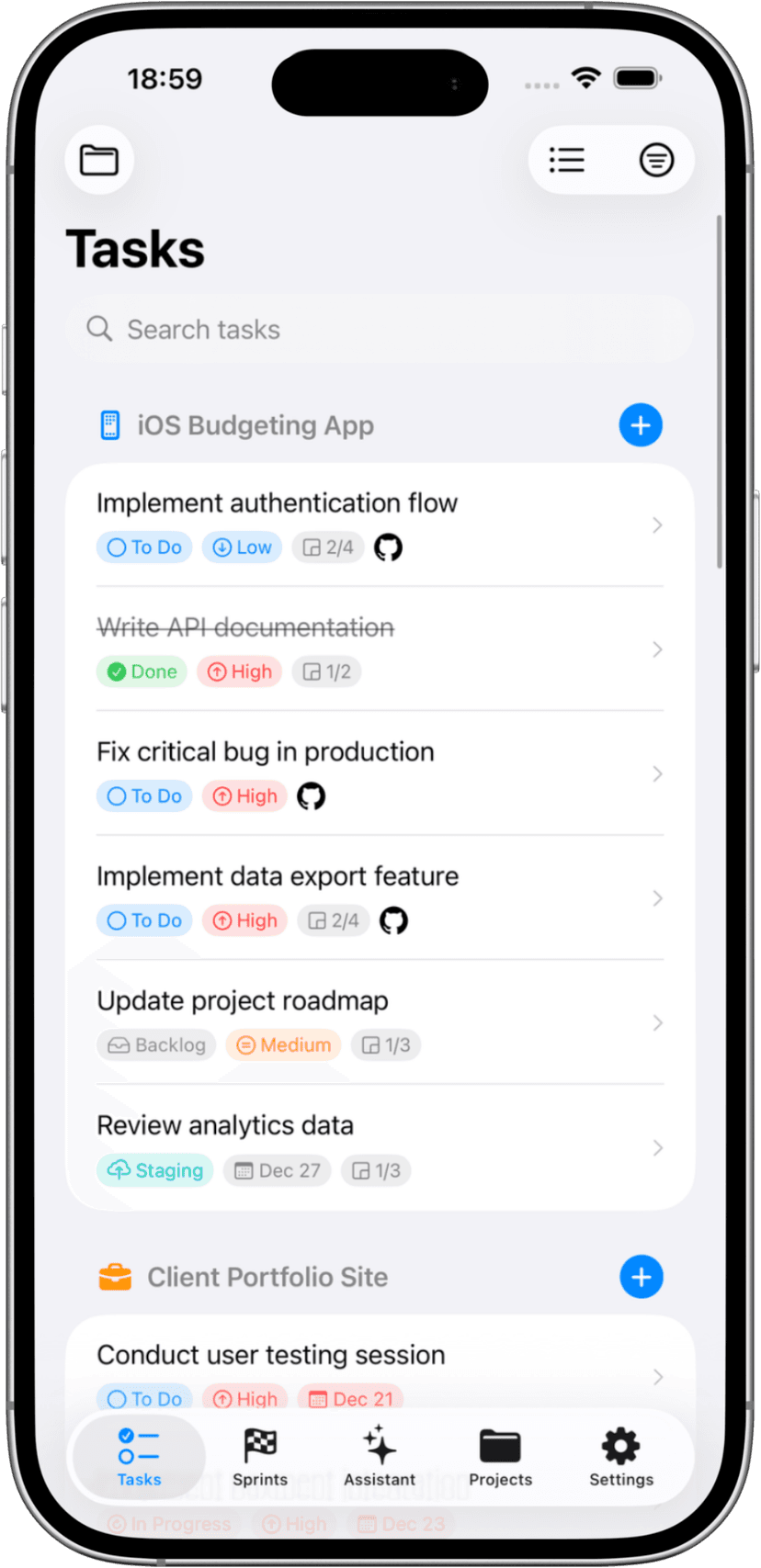
Everything You Need in Your Pocket
Capture tasks anywhere, stay organized everywhere. Solocrafter turns your iPhone into a complete productivity system.
Lightning-Fast Capture
- • Share Extension captures from any app—Safari, Mail, Messages
- • AI parses dates, priorities, and projects automatically
- • Siri Shortcuts for hands-free task creation
- • Widget for quick capture without opening the app
Focus on Today
- • Today view cuts through the noise—see what matters
- • Priority levels show what needs attention first
- • Check off tasks with satisfying taps
- • Due dates keep you accountable
Time Tracking on the Go
- • One-tap timer on any task—track time anywhere
- • Live Activities show timer on Lock Screen and Dynamic Island
- • See total hours per project for accurate billing
- • Perfect for freelancers tracking hours
Sync Everywhere
- • Capture on iPhone, execute on Mac or iPad
- • iCloud sync is automatic and private
- • Works offline—syncs when you reconnect
- • Your data stays in YOUR iCloud, not third-party servers
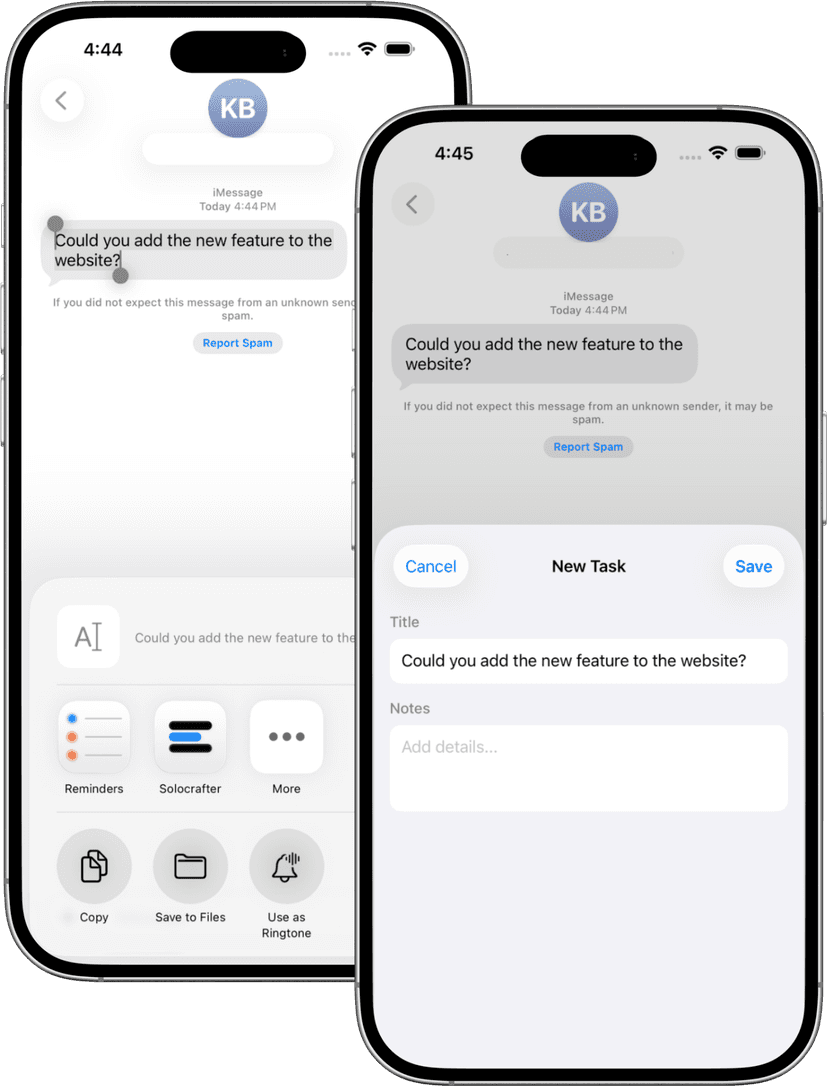
Turn Anything Into a Task
See something in Safari you need to follow up on? Got an email that requires action? Share it directly to Solocrafter and never lose track.
- Share Extension works with any app
- Links and content automatically attached to tasks
- Quick capture without context switching
- Add to any project with a tap
Track Time Without Interruption
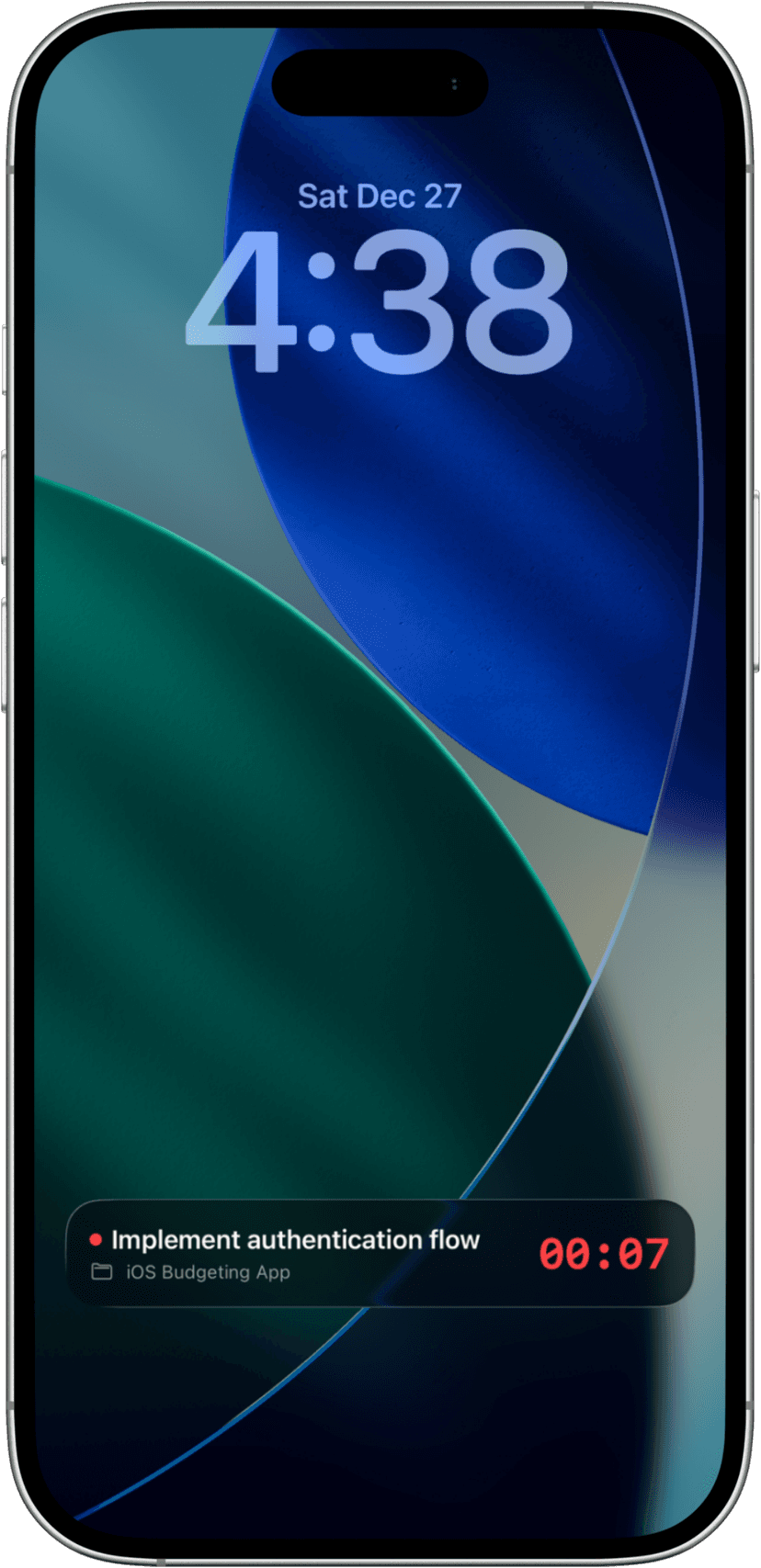
When you are tracking time on a task, see your running timer right on your Lock Screen and in the Dynamic Island. No need to open the app to check your progress.
- See active timer on Lock Screen
- Dynamic Island shows task name and elapsed time
- Stop timer with a tap—no app switching
- Perfect for tracking billable hours on the go
Perfect for Life on the Go
Whether you are commuting, traveling, or just away from your desk, Solocrafter keeps you productive.
Busy Professionals
Capture action items from meetings instantly. Review and organize later when you have time. Never drop the ball.
Freelancers & Gig Workers
Track tasks and time for multiple clients. Quick capture between jobs, accurate billing later. Time tracking in your pocket.
Students
Assignment deadlines, study tasks, project milestones. Capture in class, organize in the library, complete anywhere.
Frequently Asked Questions
What is the best task manager app for iPhone?
The best task manager for iPhone should let you capture tasks quickly, stay organized with due dates and priorities, and sync seamlessly with your other devices. Solocrafter does all of this with AI-powered task creation, a Share Extension for quick capture, and iCloud sync to Mac and iPad.
Can I add tasks using voice or Siri?
Yes. Solocrafter supports Siri Shortcuts so you can add tasks using voice. The AI also understands natural language—just type or speak what you need to do and it creates the task with the right project, due date, and priority.
Will my tasks sync with my Mac and iPad?
Everything syncs automatically via iCloud. Capture a task on your iPhone while on the go, and it appears instantly on your Mac when you sit down to work. No separate account needed—just your Apple ID.
Does it work offline without internet?
Yes. Solocrafter works completely offline. Add, edit, and complete tasks on the subway, on a plane, or anywhere without service. Everything syncs automatically when you reconnect.
How is this different from Apple Reminders?
Solocrafter goes beyond simple reminders with AI-powered task creation, visual Kanban boards, time tracking for billing, multiple projects with colors, and advanced organization. It is built for solo professionals who need more than basic reminders.
Is there time tracking on iPhone?
Yes. Track time on any task with one tap. Solocrafter uses Live Activities to show your running timer right on your Lock Screen and Dynamic Island. Perfect for freelancers tracking billable hours on the go.
Never Lose Another Task
Download Solocrafter and turn your iPhone into a pocket productivity powerhouse.

Free to download • No credit card required • Cancel anytime